
If you're passionate about music and want to turn that passion into profit, selling sample packs on Trakjungle is an excellent way to do so. Trakjungle is a marketplace for music producers that allows you to sell your sample packs and make money doing what you love. In this article, we'll guide you through 7 easy steps to get started with selling sample packs on Trakjungle.
Key Takeaways:
1. Selling sample packs on Trakjungle can be a profitable venture for music producers.
2. Follow these 7 easy steps to get started with selling sample packs on Trakjungle.
3. You will need to understand the market for sample packs, create high-quality sample packs, build your brand and online presence, promote your sample packs, optimize your product listings, and provide excellent customer service to succeed.
4. Invest in audio production software and equipment to ensure your samples sound professional.
5. Promote your sample packs through various marketing strategies such as social media advertising, email marketing, and collaborations with influencers.
Step 1: Register an Account and Create a Profile
To sell sample packs on Trakjungle, start by registering an account. It's a straightforward process, requiring just a valid email address. Once registered, create your profile by providing all the necessary details. Once your profile is created, you are now ready to sell sample packs.
Step 2: Create Sample Pack Artwork
The next step to sell sample packs is creating compelling artwork for your sample pack. It's like the cherry on top of a cake. Ensure it's of high quality and resonates with the theme of your sample pack. Remember, a well-designed cover image can be a significant selling point.
Creating a visually appealing artwork doesn't have to be a daunting task. There are several online platforms where you can design high-quality artwork for your sample packs, even with little to no design experience. Here are some recommended sites to help you get started:
Canva: A user-friendly platform offering a range of templates and design elements to create striking artwork. It also provides customization options to help you align the design with your brand theme.
PhotoPea: A free photoshop online clone that gives you almost all the power of photoshop for free. This is a great tool to use if you are running on a tight budget.
Fotor: A great platform for creating artwork with its easy-to-use features and a wide range of templates. It also offers photo editing tools to enhance your images.
Snappa: A platform that makes it easy to create artwork with its drag-and-drop feature. It offers a range of templates and graphics to help you design the perfect cover image.
Remember to choose a platform that suits your design skills and the theme of your sample pack. With the right tools, creating artwork that resonates with your audience becomes a breeze.
Step 3: Curate Sample Pack and Create Audio Sample
To sell sample packs successfully, focus on the quality of the audio samples. Ensure they are recorded and processed to a high standard with minimal noise or artefacts. Including a variety of samples in one pack can appeal to a broader audience, maximizing versatility. Ensure that your samples are in .wav format as that is the industry standard for lossless audio.
In addition, You should create an audio track with majority of the samples in your pack. This way, your audience can get a feel of the overall vibe of your sample pack.
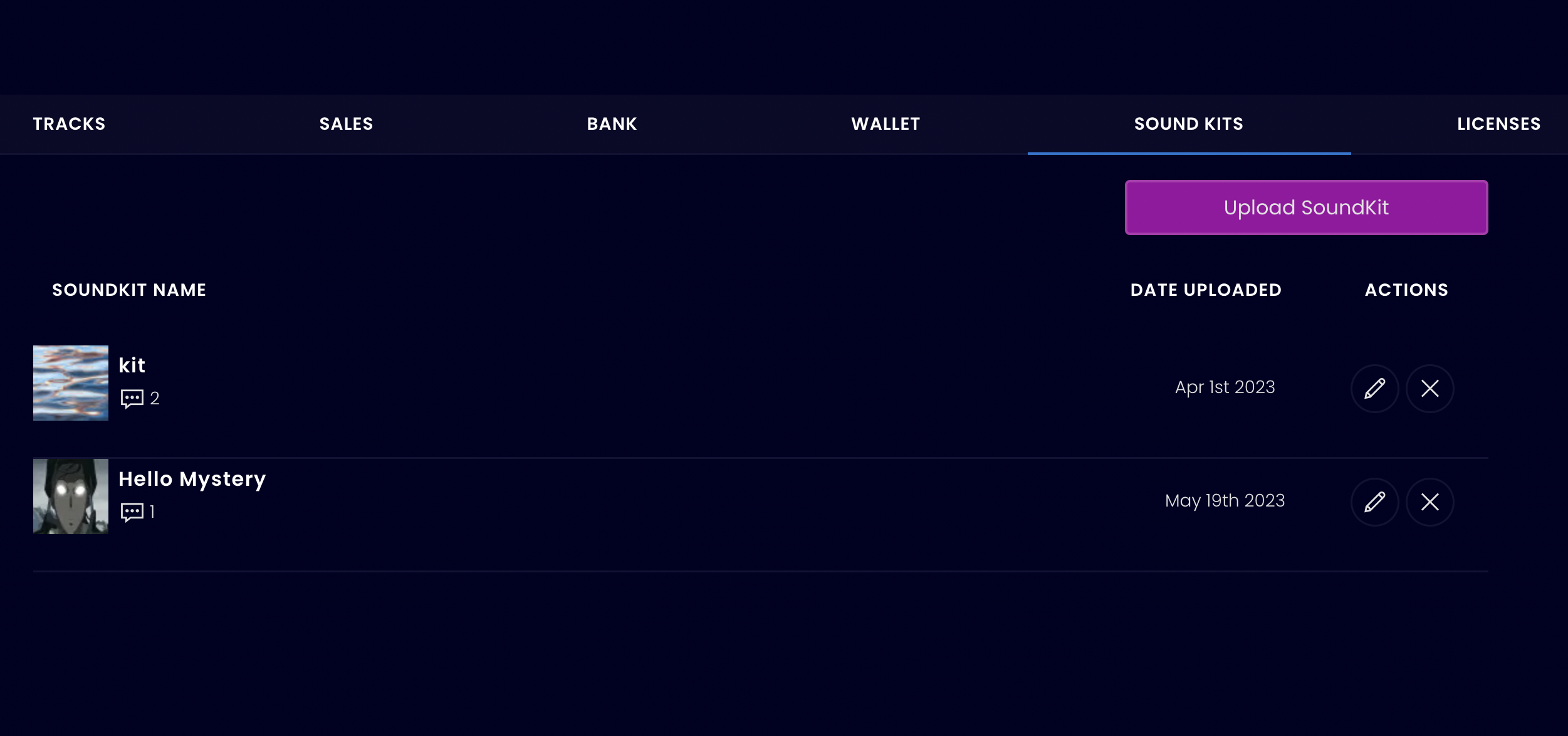
Step 4: Navigate to Your Dashboard and Click Upload
Now you are ready to sell sample packs. Navigate to your dashboard and click on the upload option.
Your Trakjungle dashboard is your main control station. This is where you upload majority of your digital assets (beats, soundkits, licenses). If you are having trouble finding your dashboard, follow the link that says "Dashboard" on the top menu bar (you are required to login to see this menu option). Alternatively, you can find your a dashboard menu item when you click on your profile dropdown menu.
Step 5: Fill Out the Upload Form
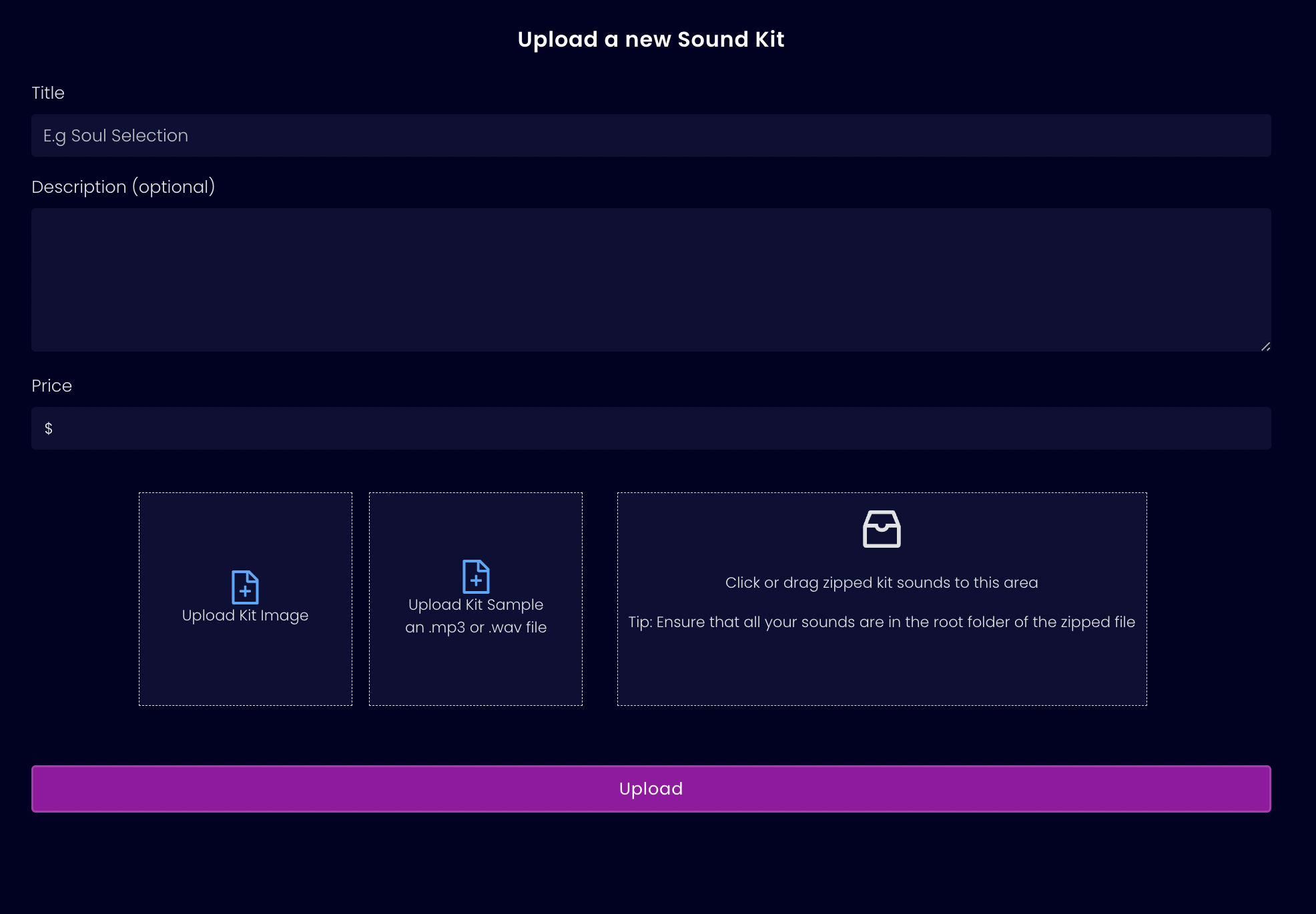
Filling out the upload form is a crucial step to sell sample packs on Trakjungle. Provide all necessary information in the product description section, including clear instructions and explanations on how to use the samples. This is also the form where you set a price for your sample pack.
Setting the right price for your sample packs is crucial. To avoid overpricing or underpricing your packs, consider implementing a well-thought-out pricing strategy. Research the market to understand the going rate for similar packs within the same genre and with a comparable number of samples. This information can act as a baseline for pricing your sample packs effectively.
Step 6: Attach Zipped Files. Use Media Uploader to Attach Sample
Uploading your files marks the final step in your journey to sell sample packs. In this phase, you'll need to upload three specific files: an image, an audio track sample, and the zipped samples. Thankfully, Trakjungle has streamlined the upload process to be both smooth and uncomplicated.
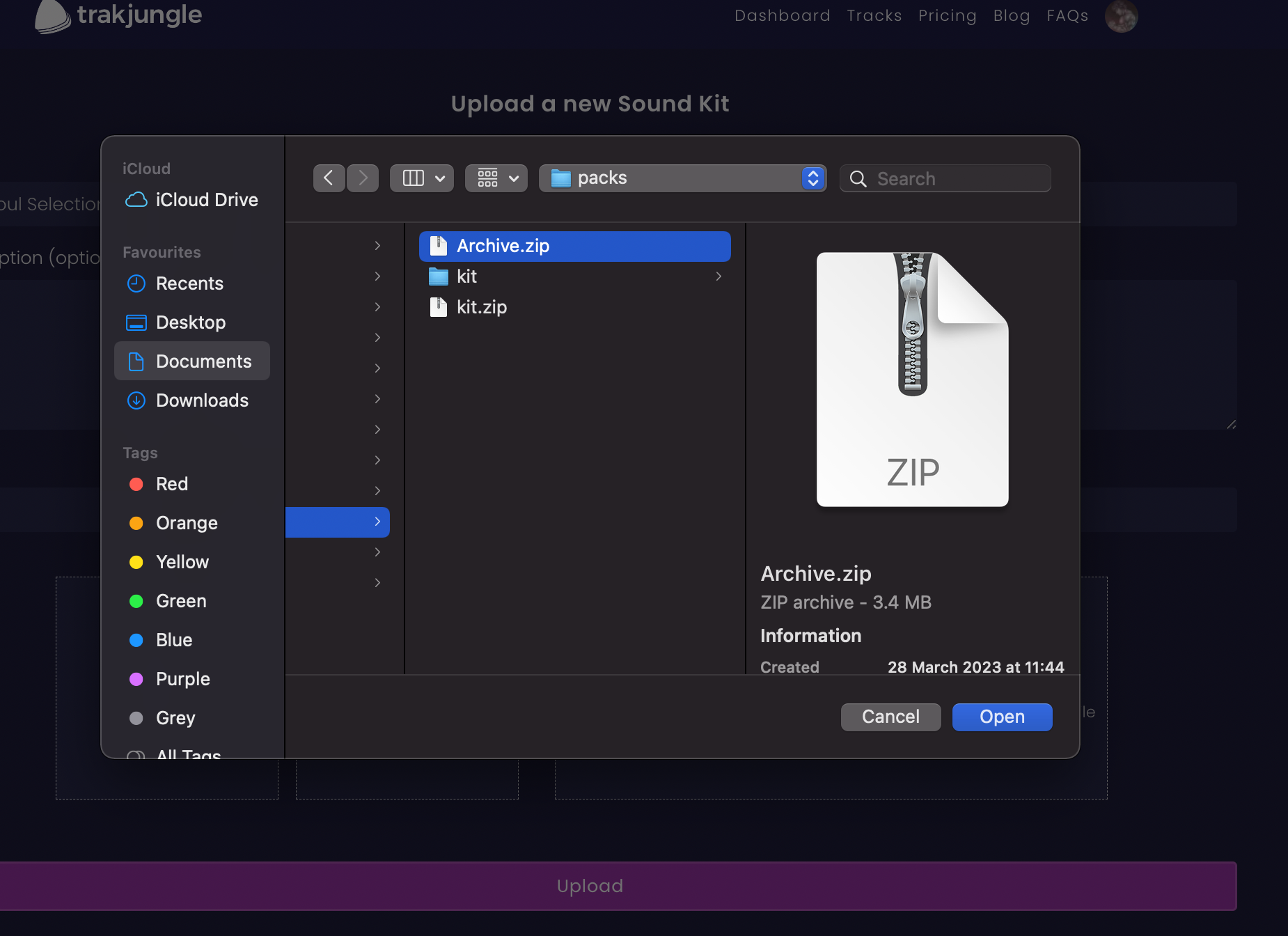
Utilize the media uploader, accessible to all users, to upload both the image and the audio track sample. When it comes to uploading the zipped file, simply drag and drop it from your computer into the designated drop zone.
To maintain a neat and user-friendly setup, organize your samples by categorizing them into separate folders.
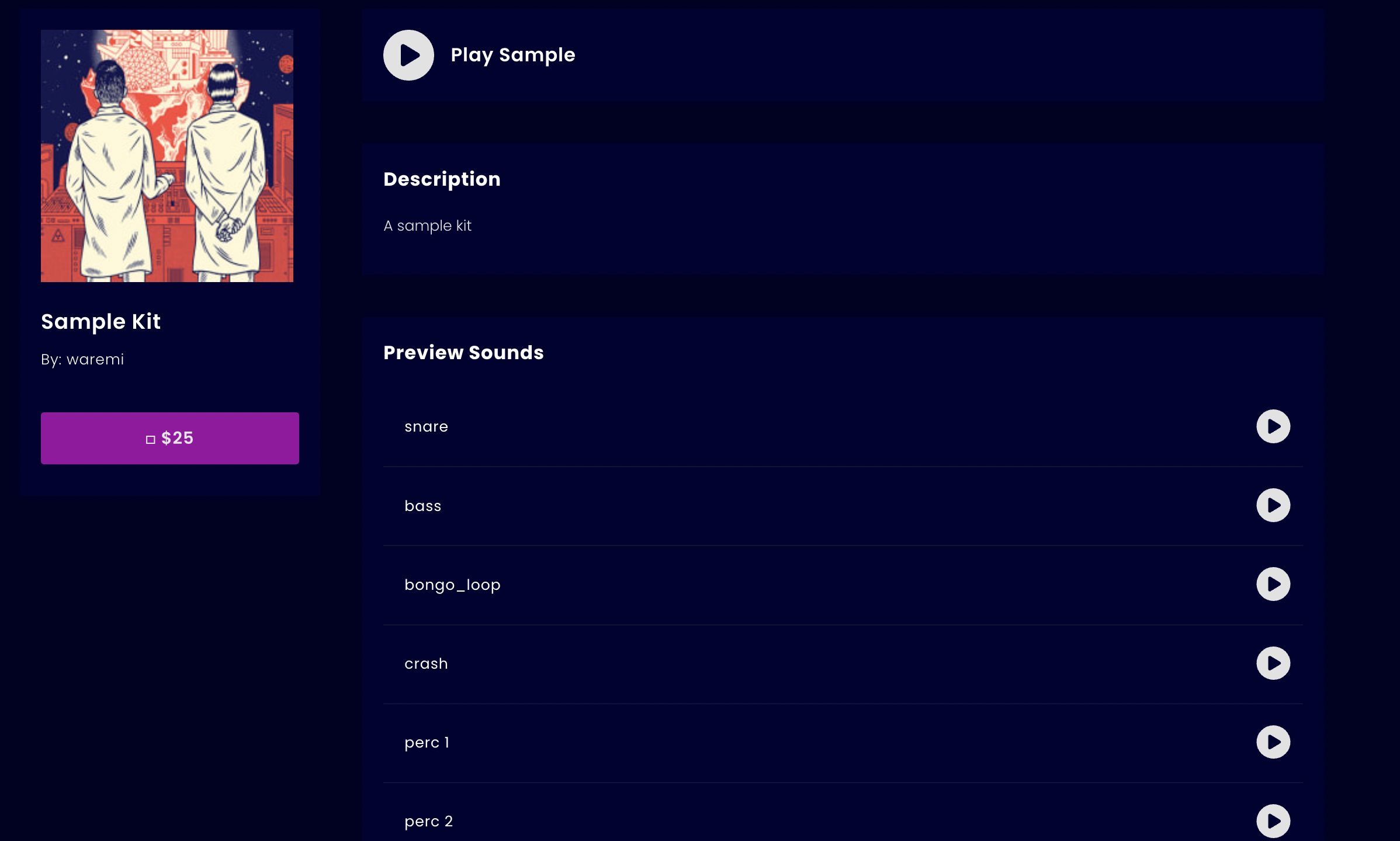
Step 7: Check Out Your New Soundkit Page and Preview Your Sounds with Our Audio Player
Finally, preview each individual sounds with Trakjungle's audio player. This unique feature allows your customers to preview the sounds in the sample pack, offering them a clear idea of what they can expect, which is not available on most other platforms.
FAQs
Q: What file format should my samples be in?
A: Your samples should be in .wav format, the industry standard for lossless audio, to ensure the highest quality.
Q: How do I set the right price for my sample packs?
A: Conduct market research to understand the going rates for similar packs in the same genre and with a comparable number of samples. This data can serve as a baseline for pricing your sample packs effectively.
Q: Can customers preview the sounds in my sample pack on Trakjungle?
A: Yes, Trakjungle offers a unique feature that allows customers to preview individual sounds in the sample pack, providing a clear idea of what to expect.
Q: What tools can I use to create artwork for my sample pack?
A: You can use online platforms like Canva, PhotoPea, Fotor, and Snappa to create visually appealing artwork for your sample packs.
Q: How can I promote my sample packs on Trakjungle?
A: Leverage various marketing strategies such as social media advertising, email marketing, and collaborations with influencers to effectively promote your sample packs.